For the past few months I've been experimenting with different ways of working with agents, which is what led to projects like sidecar and td, plus a bunch of other stuff I haven't open sourced yet. This weekend I sort of stumbled into a workflow I'm finding really nice, and it feels like it's pointing somewhere interesting.
I need a good name for it. "Continuous development" is close but doesn't quite get there. "Autopilot" is too vague. I've been calling it the backlog loop for now, which will do until something better comes along.
Where this came from
I'd been playing with Ralph loops, the idea of running agents in a loop with minimal human intervention. The concept is great but in practice I found it a little too loose and non-deterministic for my taste. This is a variation that added more structure and, for me at least, works a lot better.
The way it works is: I use td, my task manager, to create an epic and add a few stories to it, then I start a loop that iterates over those stories sequentially. Any task manager would work here. If you're using Linear or Jira or just a markdown file, the same idea applies. Only one task is worked on at a time, which sounds like a limitation, but it completely eliminates worktrees, multiple branches, and merging. And I found things come together at roughly the same speed anyway, so I'll take that trade every time.
My actual job becomes managing the queue. The agent just works in the background.
How the loop works

Each loop iteration is a fresh agent session with no memory of what happened before. When an agent starts, it checks for any tasks sitting in review (up to three) and reviews them, flagging issues or creating new follow-up tickets for anything that needs attention. Then it picks up the highest-priority open task and works on it. Before marking it done, it has to provide two things: a passing test run and screenshots of the feature actually working.
Then the next session starts and does the exact same thing.
I've tried it with and without the review step, and the review step makes a huge difference. It's turned out to be worth the extra time and tokens. An agent reviewing its own work tends to see what it expected to see, but a separate fresh session catches different things. Starting clean for each task also keeps the context window from getting bloated, which helps with focus.
Priority order also turned out to help more than I expected. If I think of something that needs to happen sooner, I just create a higher-priority ticket and it floats to the top of the queue on the next iteration. No stopping anything, no reorganizing. And since I'm already chatting with my OpenClaw agent to create and refine tasks, adjusting the queue is as easy as saying "actually, let's skip that one" or "break this into smaller pieces."
One thing that doesn't change from any other agentic setup: the codebase needs to be organized in a way that agents can actually navigate. Skills files, clear conventions, predictable directory structure. There's upfront work to get that in place. Once it's there, the loop doesn't need babysitting.
What it built over the weekend
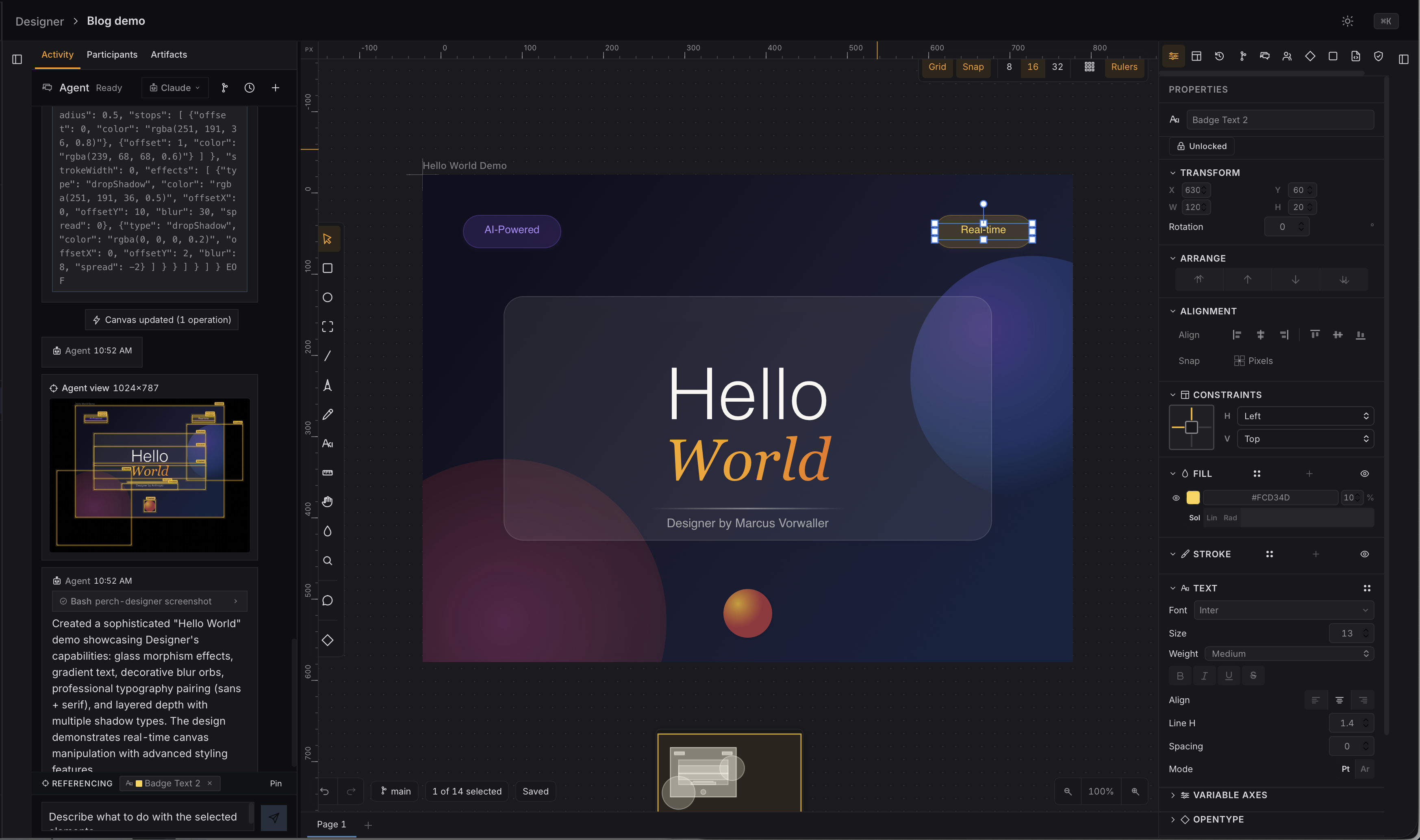
I tested this by building a Figma-style design tool I'm calling Designer, which lives inside a larger dev dashboard I've been working on. The initial plan had around 60 to 70 tasks. I kicked it off Friday night and woke up Saturday morning to what is, by any measure, a solid vibe-coded design tool.
I kept adding tasks over the weekend. I was usually a few tasks ahead of the agent, which is exactly the right balance. I could walk away from my laptop for hours and come back to find more things done. Here's what Designer ended up with after all of that:
- Canvas — pan and zoom, viewport culling, LOD rendering, dirty-region tracking, minimap, rulers, and guides with on-canvas numeric editing
- Elements — rectangles, ellipses, lines, arrows, paths, text, groups, frames, images. Multiple fills and strokes per element. Blend modes (16 of them). Drop shadow, inner shadow, blur, and background blur
- Text — rich text editing with mixed styles per character. Google Fonts integration with a full font picker including search, categories, preview, and favorites. Variable font axes and OpenType feature controls
- Frames — auto-layout with direction, gap, padding, wrap, and constraints. Device presets and artboard templates with a gallery. Clip content toggle
- Layers panel — search with name filter and type chips. Full keyboard navigation. Batch visibility and lock toggling. Drag reorder and nesting. Scroll to selected
- Tools — Select, Rectangle, Ellipse, Frame, Line, Pencil (with bezier fitting and pressure sensitivity), Pen (with bezier curve editing), Text, Hand, Eyedropper, and a Measure tool
- Styling — full color picker with HSV field, hue/opacity sliders, and hex/RGB/HSL inputs. Gradient editor. Copy/paste styles between elements
- Vector editing — boolean operations (union, subtract, intersect, exclude). Vector and alpha masks. Enhanced pencil tool with eraser mode
- Components — component library panel with search, drag-to-canvas, and instance actions. Design token system with CRUD, CSS/JSON export, style picker, and bulk apply/detach
- Collaboration — real-time cursors and remote selections over WebSocket
- Versioning — version history timeline with search, thumbnails, diffs, and preview mode. Branch and merge for canvas versions
- AI integration — chat panel that creates and modifies canvas elements directly. Click-to-reference elements in chat. Visual feedback for agent operations with pulsing highlights and auto-pan. AI image generation with OpenAI and Gemini. Generative layout with prompt starters
- Developer handoff — inspect mode with CSS generation and red-line measurements
- Design critique — WCAG contrast checking, spacing, alignment, font size, and touch target audits
- Animation — timeline panel, keyframe editor, property interpolation
- Prototyping — prototype viewer, click targets, flow diagrams
- Plugins — sandboxed runtime, API bridge, SDK types
- Export — PNG, SVG, and PDF with scale and format options
- Mobile — iOS Safari canvas rendering fixes, touch-action support
- Keyboard shortcuts — organized by category with a shortcuts overlay. Z-order operations, smart selection, and zoom presets
About 78 component files and 50,000 lines of Svelte and TypeScript. The perch repo is sitting at 1,062 commits total, There's a test suite with unit tests and Playwright e2e specs. Coverage isn't where I'd want it for something going to production, but it exists and the agents use it. That's something to work on next time around.
The dashboard
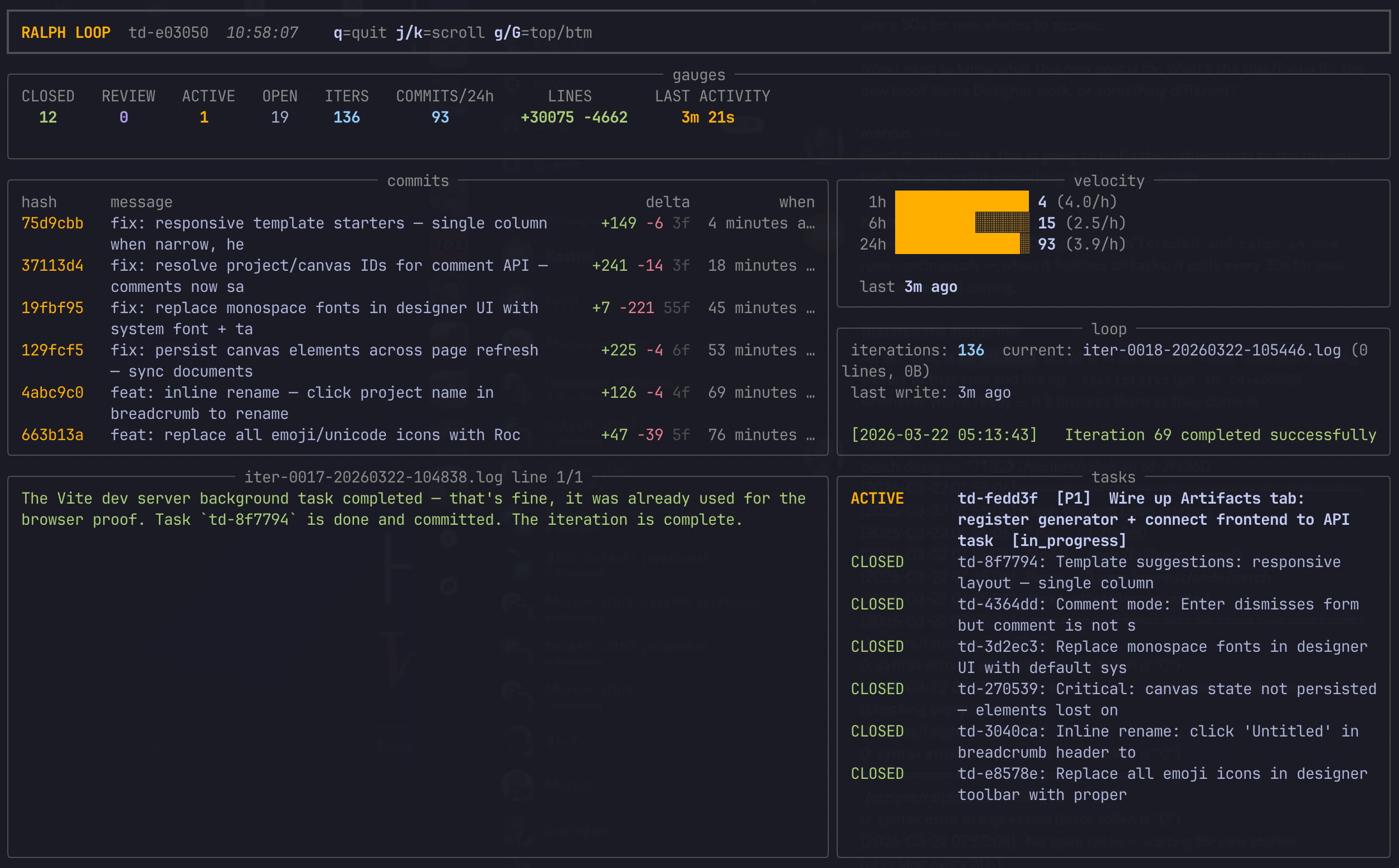
I also built a small dashboard so I can see what the loop is up to. It shows recently completed tasks, how long each one took, and what's coming up next. It's a Python Rich TUI that tails the td log for a given epic, so when I come back to my desk after a few hours away, I can see exactly what happened while I was gone.
What's next
I'm going to keep running with this. The rhythm of it, where development is happening as fast as I come up with ideas and write them down, is something I want to understand better. I can be out walking and think of a feature, message my OpenClaw agent on Discord from my phone to create and refine the task, and by the time I'm back at my desk it might already be done.
The tools are open source if you want to try something similar:
- td — task manager built for AI agents, which is what drives the backlog
- sidecar — dev dashboard for seeing what agents are up to
While writing this, I came across what Augment is building, which is remarkably close to this same workflow, packaged as a product. It's cool to see a company investing in this direction, and it's also cool that a single developer can arrive at roughly the same place with open source tools and some weekend experimentation.
That's the part that keeps hitting me. A design tool like this, or even the dev dashboard it lives inside, would have been a team-sized project not that long ago. Now one person can build it by writing good tickets and letting agents work through them. I'm curious what happens when more developers start working this way, because the bottleneck is no longer writing code. It's deciding what to build and describing it well. I have some thoughts on what that means for how software companies work when the software itself becomes a commodity, but that's a whole other post.
If you've got a better name for this workflow than "the backlog loop," I'm all ears.